
Best AI Home Remodel Apps (2026): Ten Real Renders, Every Prompt Shown

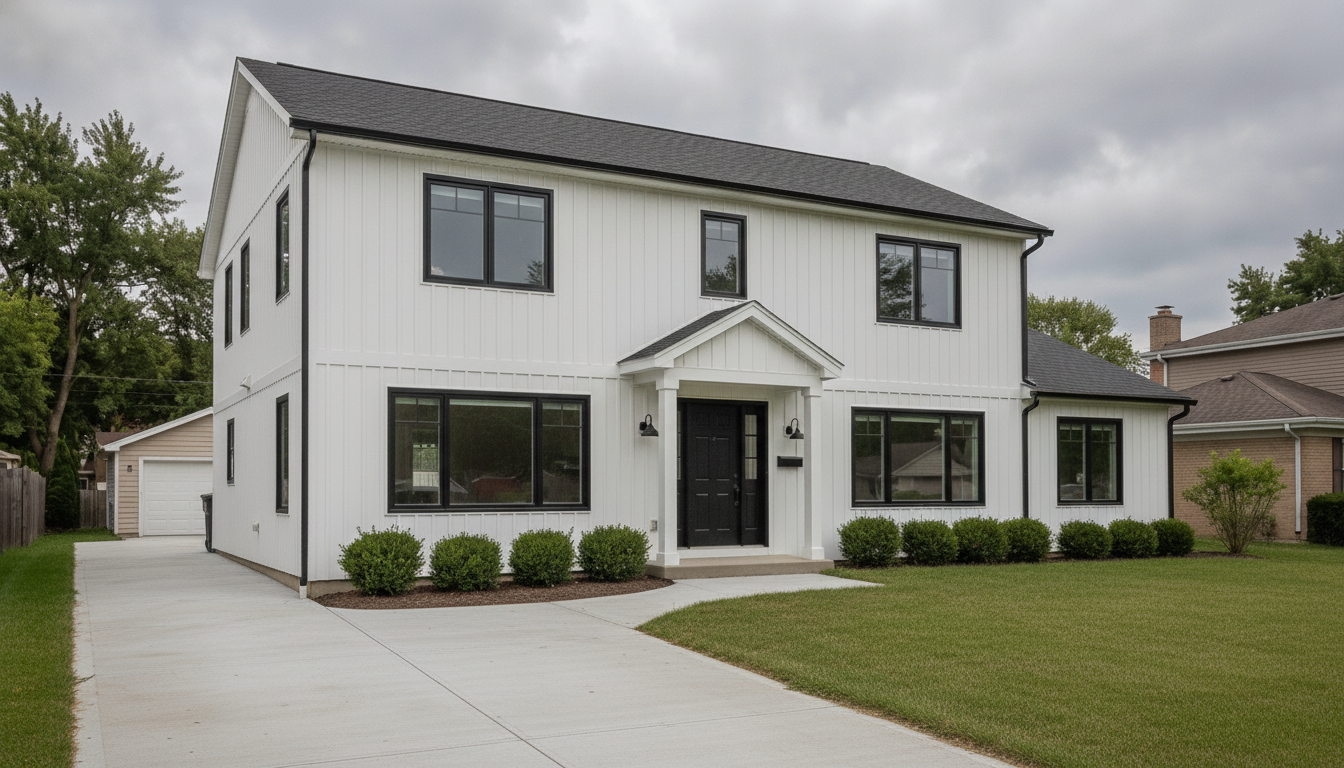

One photo, one sentence, ten seconds. Same roofline, same porch gable, same garage.
Search for the best AI home remodel app and you will find a dozen posts with the same shape: a table, six apps, a score out of ten, a winner. Almost none show a single image the tool produced. The scores have no source and the prices have no date.
This one is built the other way round. Ten real renders, further down, on four real photographs — an exterior, a kitchen, a living room and a bathroom — each published with the exact sentence that produced it and a note on what the engine got wrong. Then a table of facts about the other apps, every one dated 21 September 2026 so you can go and check.
The short version: for taking a real room — a photograph of one, or a plan or sketch of one that does not exist yet — and deciding what to do with it, we think Renovate AI is the best of these. We built it, so weigh that accordingly — and then go and look at the ten renders, which is the part you can check for yourself. The table below carries everything else: what each app costs, what its free tier actually gives you, and who publishes which figure. All of it dated, none of it rounded in our favour.
How We Did This
We ran our own tool on four real photographs: a peeling two-storey exterior, an oak kitchen, a carpeted living room and a beige-tiled bathroom. Thirteen prompts, all on 21 September 2026. We looked at all thirteen results and kept ten. The three we threw out are described further down, with the reason. Every render here is unretouched, and the prompt printed above it is the literal text we sent.
Everything below about the other apps is public and checkable: App Store listings pulled from Apple’s own lookup endpoint, and published pricing pages, all read on 21 September 2026. Where a company publishes no price, the cell says so. Where two products share a name, the table lists them separately.
One warning on the numbers. Prices in this category change monthly. If you are reading this long after September 2026, treat every figure as a starting point and go and look.
The Comparison Table
Everything here was checked on 21 September 2026. App Store figures are from the US storefront. Blank cells mean we could not verify the fact in public, not that the answer is no.
| App | Publisher | App Store rating | Free tier | Entry paid plan | Usage published? | Plan & sketch input |
|---|---|---|---|---|---|---|
| Renovate AI | Trial and Error, Inc | 4.67 from about 10,800 | 5 free renders, no account needed | $15/mo (Hobbyist), $13/mo billed yearly | No — tiers say “more usage”, “3×”, “10ד | Yes — photo, 2D plan or 3D sketch |
| Remodel AI (remodelai.app) | REIMAGE AI INC. | 4.70 from about 14,800 | — | No pricing page on their site (404) | — | — |
| Remodel AI (remodelai.io) | Yajun Yang | 3.49 from about 700 | 3 designs, no card | $29/mo (Pro), $349/yr | Yes — 1,000 / 5,000 / 25,000 designs a month | — |
| Home AI | HUBX | 4.53 from about 160,000 | — | No pricing page on their site (404) | — | — |
| Planner 5D | Planner5D, UAB | 4.36 from about 41,000 | Free tier, half the furniture catalogue | $19.99/mo (Premium), $59.99/yr | Yes — AI Studio credits per tier | Yes — draw or upload a plan, CAD export |
| DecorAI | Rocket Digital | 4.65 from about 1,300 | 3 designs a day, no account, ad-gated, watermarked | $19.99/mo, or $39.99/yr | Says unlimited generations | — |
| RoomGPT (web) | see note below | not attributed | — | Behind a login | — | — |
App Store ratings measure satisfaction and reach. They do not tell you what comes out of the tool, which is why the renders on this page carry their prompts.
Three things in that table are worth reading twice.
Two different companies ship an app called Remodel AI. Not a typo. On 21 September 2026 Apple’s US store listed Remodel AI - Home Design from REIMAGE AI INC., whose site is remodelai.app; and Remodel AI - Home Room Design from Yajun Yang, whose site is remodelai.io. They are unrelated, and the two rows in the table are not interchangeable. The detailed pricing page with the Pro, Premium and Ultra tiers belongs to remodelai.io. So you can read a review of “Remodel AI”, then subscribe on a pricing page you found by searching, and end up with a different product than the one you read about. Check the developer name on the listing.
We do not attribute an App Store rating to RoomGPT. Two publishers ship apps called RoomGPT on the US store and neither is confirmed as the official roomgpt.io web product, which is what most people mean. So we left the rating out rather than pin someone else’s stars on it. RoomGPT’s credit pricing sat behind a login, so we could not read that either.
Planner 5D comes at this from the drafting side. You draw or upload a plan, it builds a 3D model, and its Professional tier adds 4K renders, 360° walkthroughs and CAD export. That last one matters if you hand files to a draughtsman. Worth knowing before you pick: the tools in this table differ as much in what you feed them as in what they give back, which is why that last column is there.
Our Renders: Four Photos, Ten Results
All ten renders below start from one of four photographs, and each before photo sits above its group so you can check the framing yourself. Each one starts from a real room, not a staged set. All four are in bad shape on purpose — peeling siding, honey oak, stained carpet, a rusted shower — because a render of an already-nice room proves nothing.
The Exterior
Four prompts on the same elevation, two asking for paint only and two asking for a full redesign.
Sage green, paint only
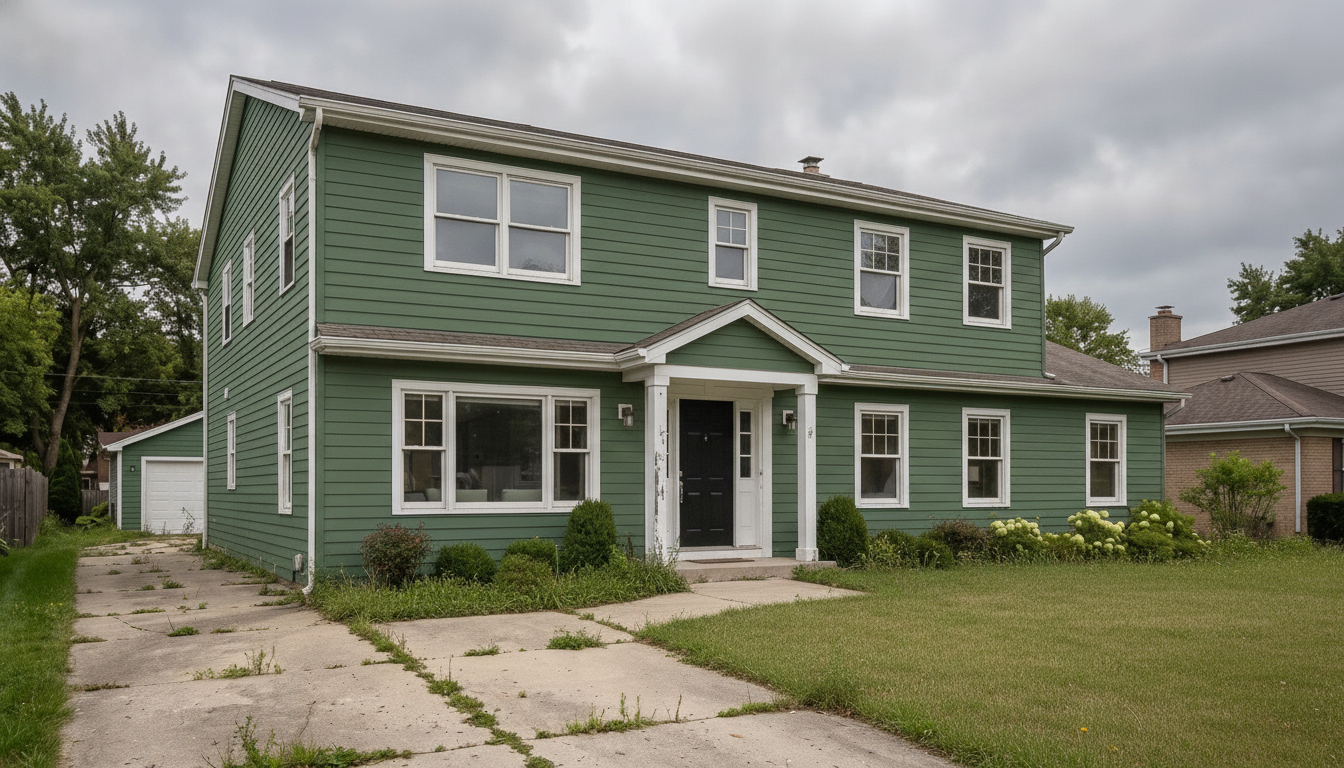
What we told Renovate AI:
Keep this house exactly as it is built and only change the colours and the yard: repaint the beige siding a deep sage green, paint all the window trim and the porch columns crisp white, paint the front door black, and tidy the overgrown yard into a mown lawn with a clean concrete driveway. Keep the siding, the roof, every window, the porch and the garage exactly where they are.
The architecture survived intact: every window where it started, the porch gable unchanged, the garage still top-left, the clapboard course lines preserved. This is the render to check if you want to know whether an AI repaint holds a real elevation together.
Free · No account needed · 10 seconds
Navy with a natural wood door

What we told Renovate AI:
Keep this house exactly as it is built and only change the colours: repaint the siding deep navy blue, paint the window trim and porch columns white, paint the front door a warm natural wood, and replace the two porch lights with black lanterns. Keep the siding, the roof, every window, the porch and the driveway exactly where they are.
Same fidelity to the building, and the black lanterns arrived exactly where the old fixtures were. Wood against navy is the pairing nobody can picture from a paint chip, which is the honest reason to run a render at all.
Free · No account needed · 10 seconds
Modern farmhouse, full redesign
What we told Renovate AI:
Turn this peeling beige two-storey into a modern farmhouse exterior: white board-and-batten siding, a dark charcoal roof, black window frames, a black front door, black carriage lights either side of the door, a fresh grey concrete driveway and a mown green lawn with clipped boxwood along the foundation. Keep the house’s shape, the window positions, the front gable porch and the detached garage exactly where they are.
This is the one that sells the idea. The roofline, the gable porch and the garage all held, and the yard cleanup that got skipped on the sage render actually happened here.
Free · No account needed · 10 seconds
Charcoal and cedar, full redesign
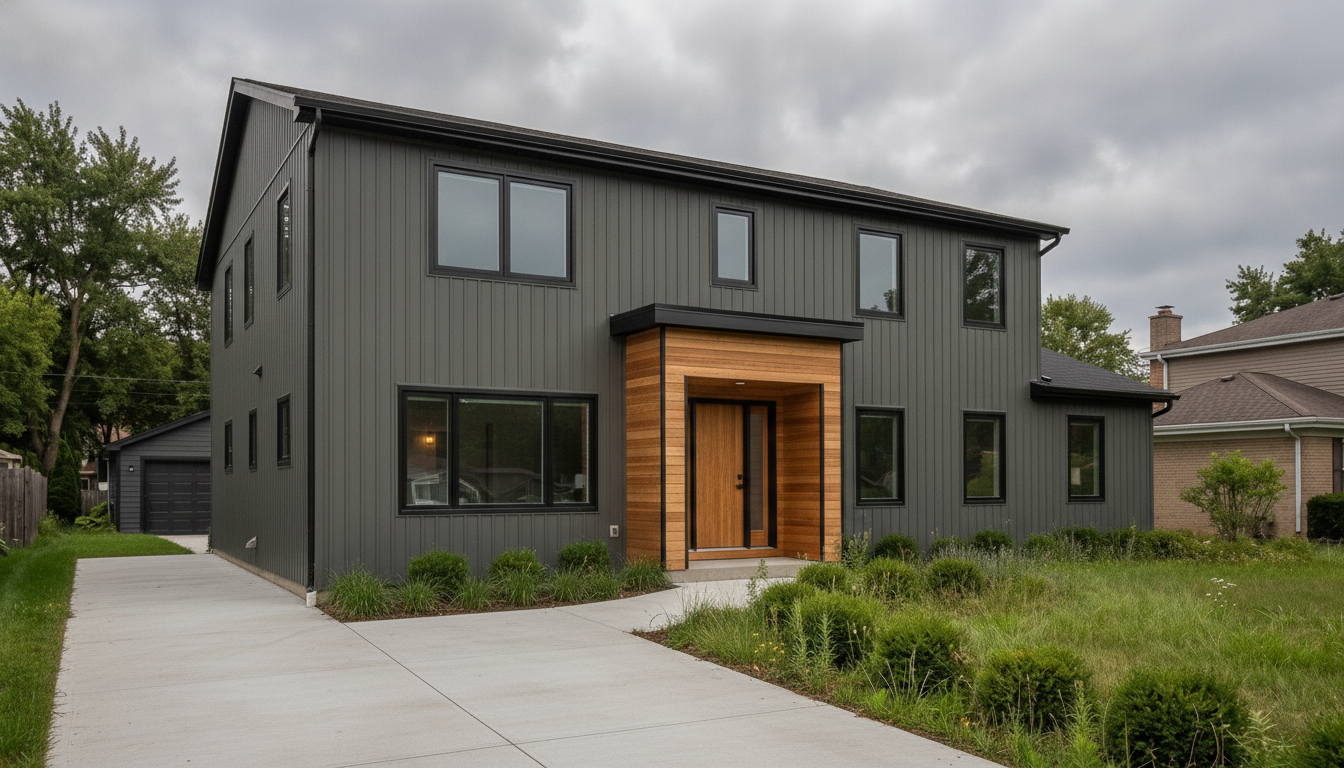
What we told Renovate AI:
Turn this dated two-storey into a modern dark exterior: charcoal vertical siding with a warm cedar accent panel around the entry, black slim-frame windows, a natural wood front door, a flat black porch roof instead of the gable, a new poured concrete driveway and low ornamental grasses along the foundation. Keep the house’s footprint and the window positions where they are.
The cedar entry surround and the flat canopy are exactly what was asked for, and the ornamental grasses read as grasses rather than generic shrubs.
Free · No account needed · 10 seconds
The Kitchen
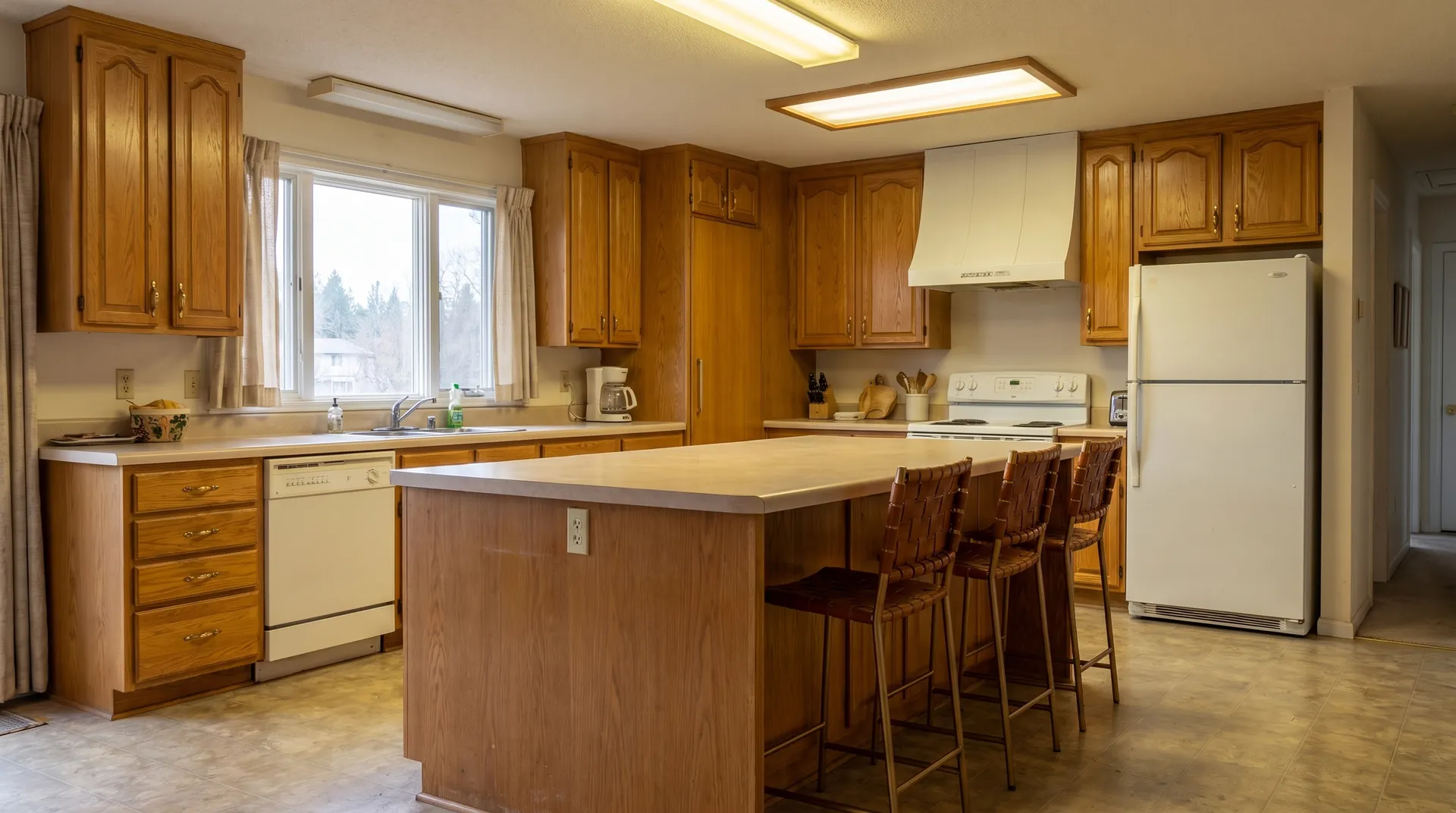
Four prompts on the same oak kitchen, three of them kept. This room produced our most useful failure.
Painted white, everything else kept
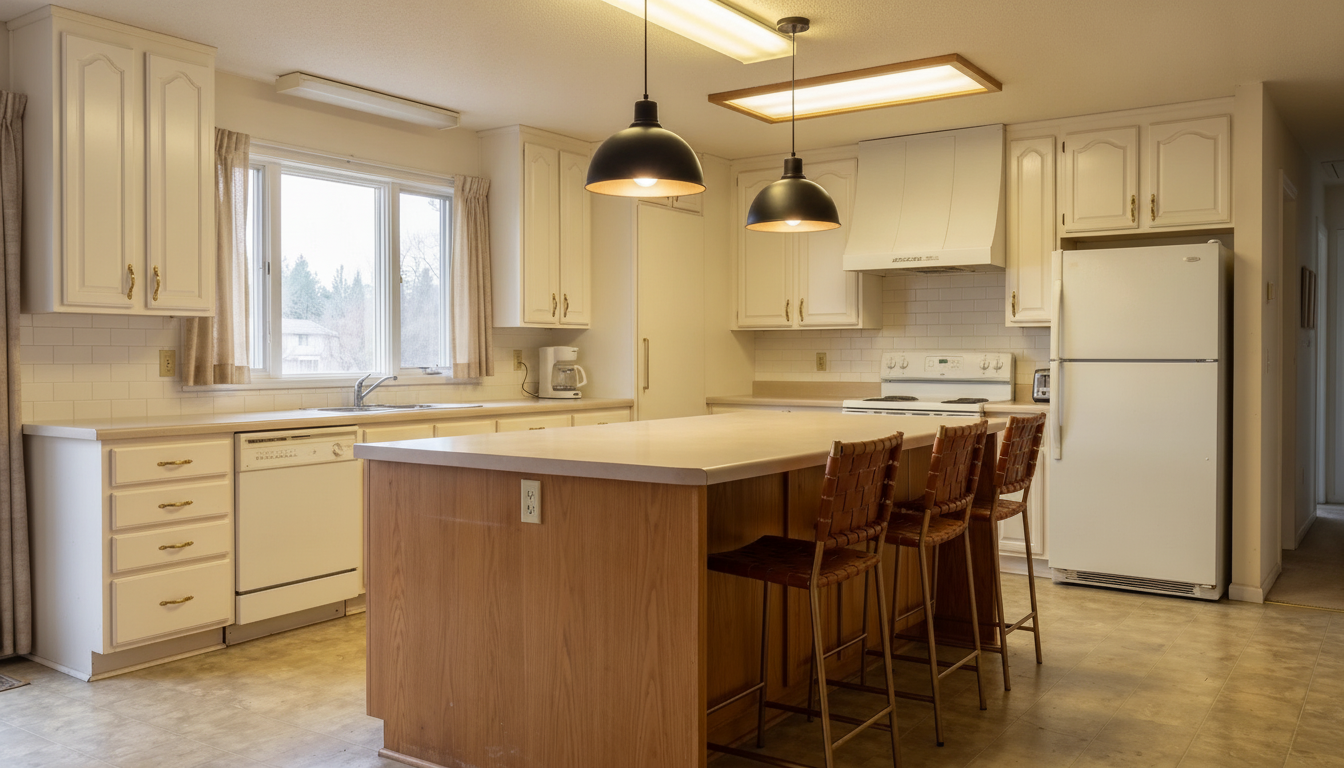
What we told Renovate AI:
Keep this kitchen’s layout exactly as it is and only change finishes: paint the honey oak cabinets creamy white with brushed brass cup pulls, replace the laminate countertops with white quartz, put a white subway tile backsplash on the walls, and replace the fluorescent ceiling panels with two black dome pendants over the island. Keep the window, the white fridge, the white range, the dishwasher, the island and the floor exactly where they are.
The most common question about a kitchen like this is whether painting the oak is enough. Here is that answer, with the appliances and the floor left alone so the comparison is fair.
Free · No account needed · 10 seconds
Green below, white above
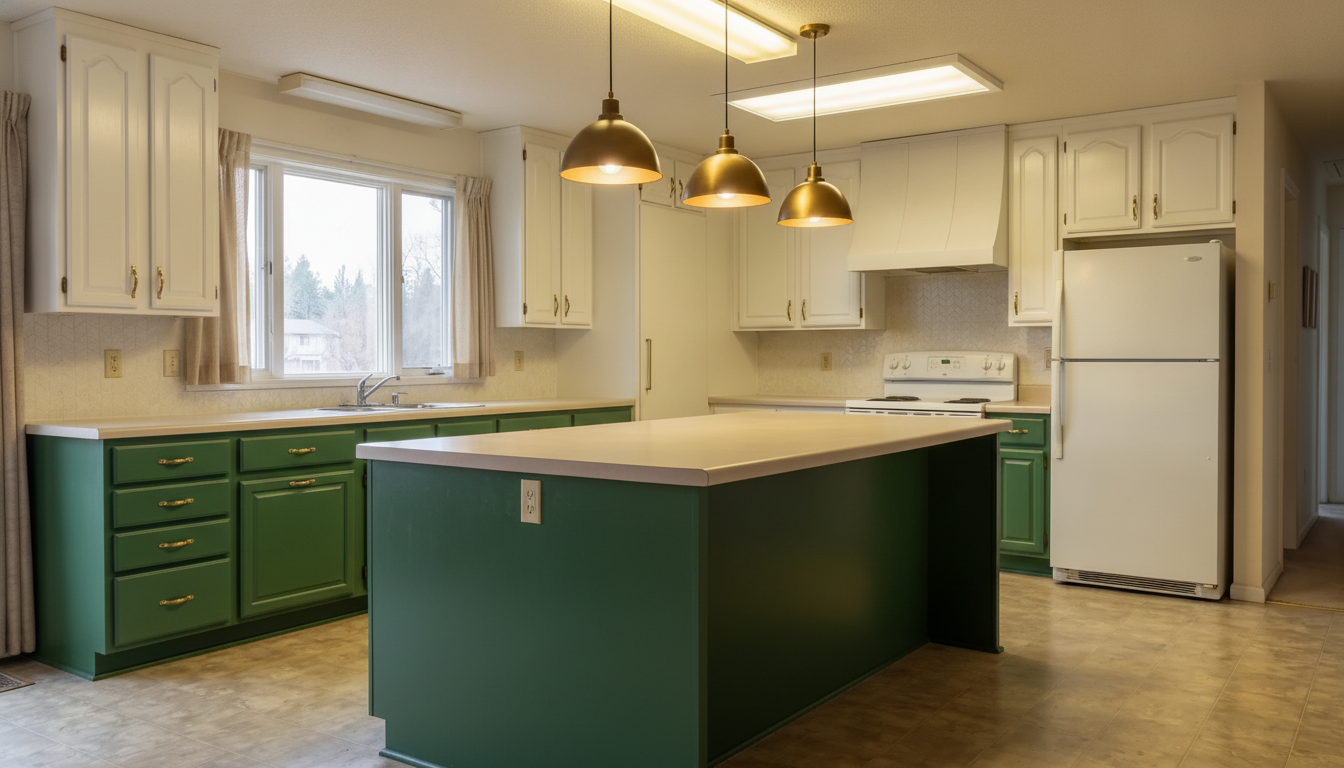
What we told Renovate AI:
Remodel this kitchen in a two-tone modern style: deep forest green lower cabinets and white upper cabinets with slim brass handles, white quartz countertops, a white zellige tile backsplash, a stainless range and a stainless fridge, three brass dome pendants over the island and a wide-plank white oak floor. Keep the window and the island position where they are.
Two-tone is the usual answer for a kitchen with a big island, because the island carries the darker colour without closing the room in. The green and the brass pendants landed, and the arched doors were kept rather than reinvented, which is correct for a repaint.
Free · No account needed · 10 seconds
Matte black — and only a third of it
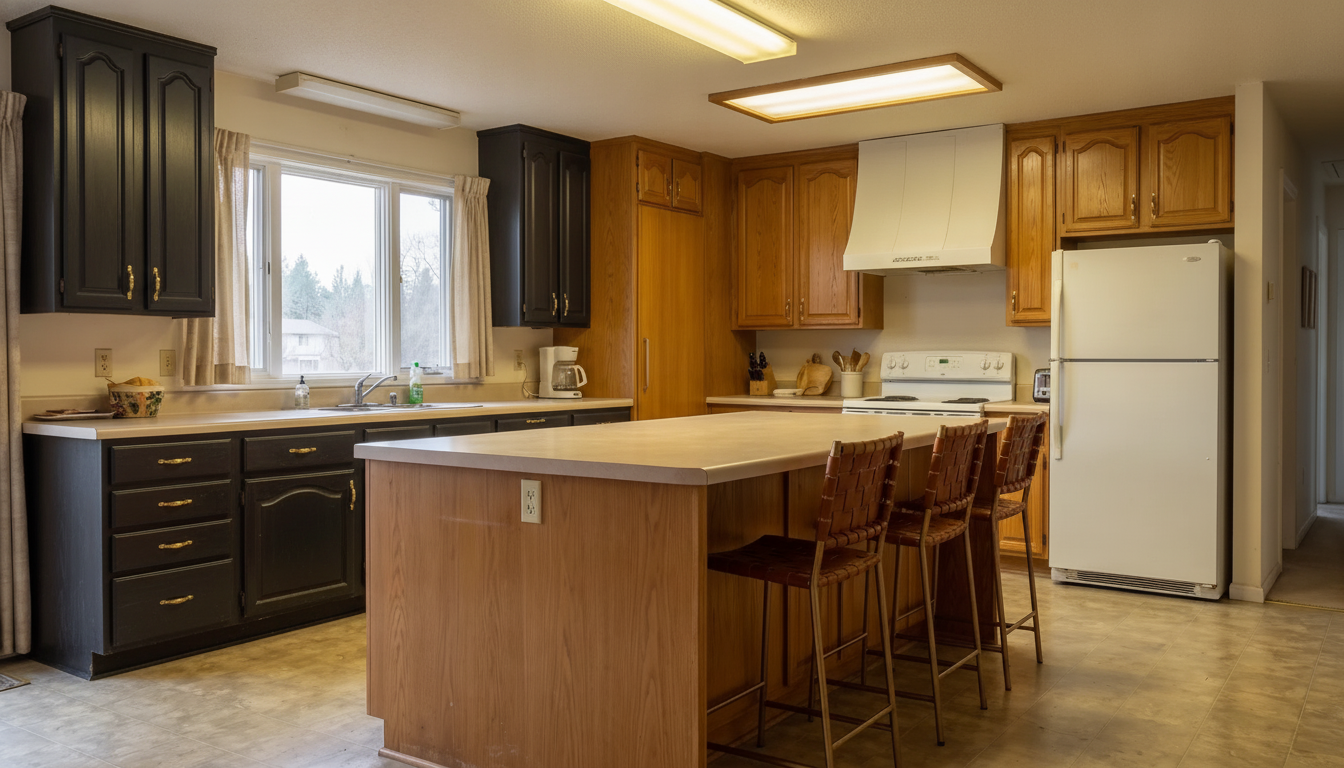
What we told Renovate AI:
Keep this kitchen completely as it is and change only one thing: paint the honey oak cabinets a soft matte black, leaving the doors the same shape with the same arched panels. Keep the laminate countertops, the beige floor, the white fridge, the white range, the fluorescent ceiling lights, the curtains and the island exactly as they are.
We are leaving this one in because it is the clearest evidence in the post. Everything we told it to keep, it kept: the laminate counters, the beige floor, the white appliances, the fluorescent panels, the curtains, the island, even the fruit bowl and the coffee maker.
Free · No account needed · 10 seconds
The Living Room
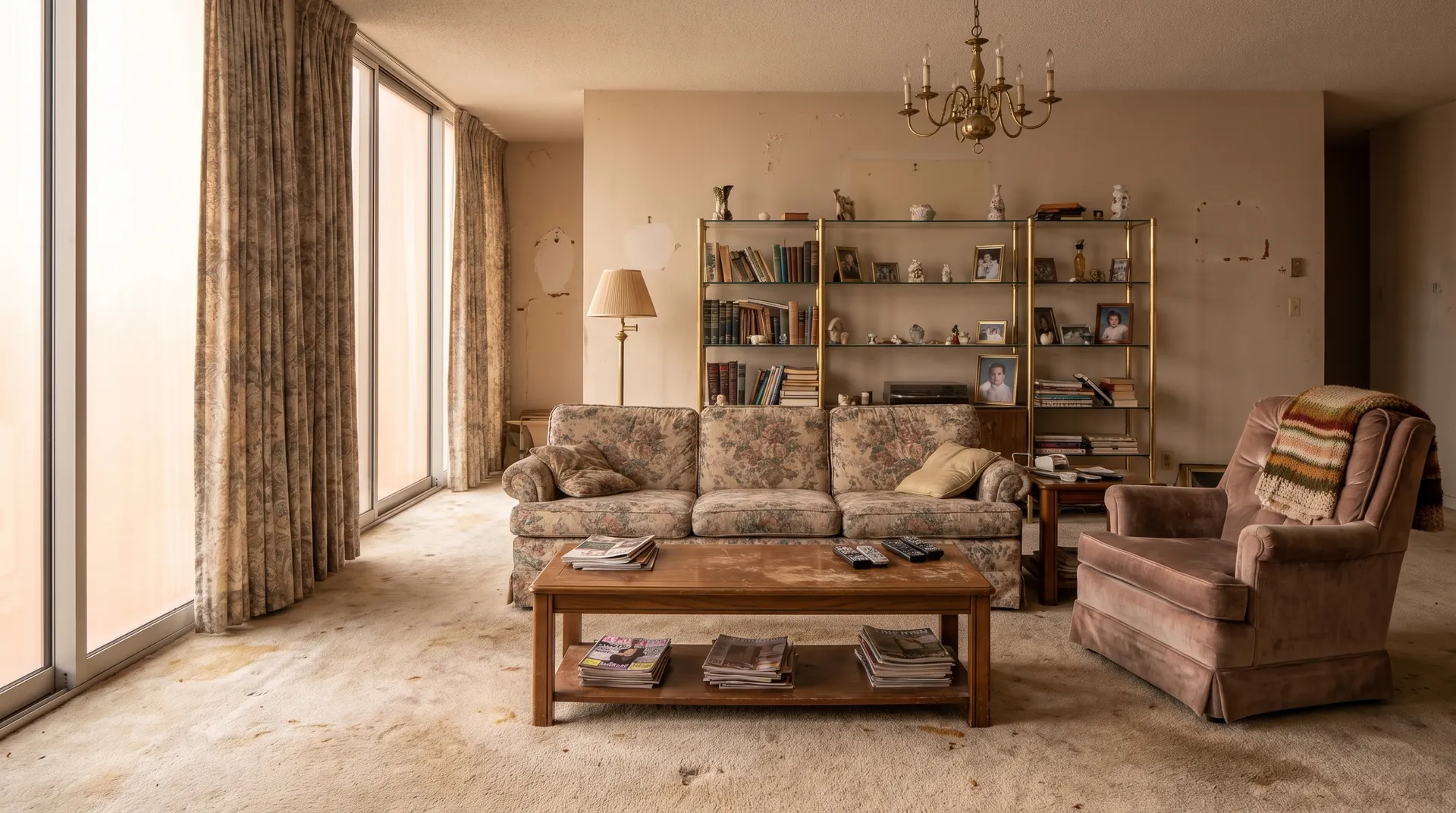
We ran three prompts on this room and kept one. That is the worst hit rate of the four rooms, and the one we kept is the best render in the post.
Keep every single object, change every surface
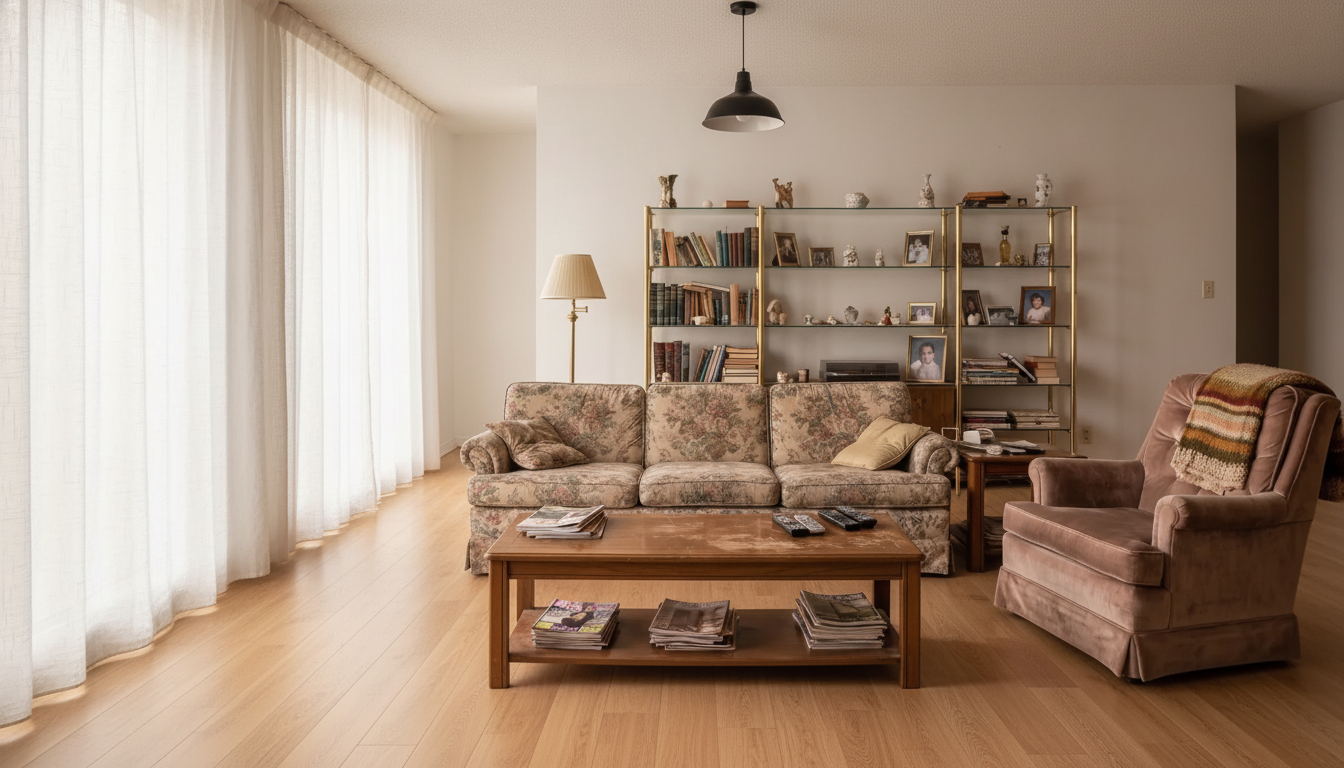
What we told Renovate AI:
Keep this living room’s furniture layout exactly as it is and change only the surfaces: replace the stained beige carpet with pale oak flooring, paint the walls and ceiling white, swap the floral curtains for plain white linen ones, and replace the brass chandelier with a simple black pendant. Keep the floral sofa, the pink armchair, the wooden coffee table, the brass and glass shelving unit and everything on the shelves exactly where they are.
This is the hardest thing to ask an AI renderer for and the most useful thing to get. The carpet, walls, curtains and light all changed. The floral sofa, the pink armchair with its knitted throw, the coffee table with the magazines stacked underneath, the brass and glass unit and every book, vase and framed photograph on it came back untouched. If you are deciding whether floors and paint alone are enough, this is the render that answers it.
Free · No account needed · 10 seconds
How to write the sentence. The renders above that landed first time all did the same thing: one clear change, then an explicit list of what stays. “Replace the carpet with wide plank oak, keep the sofa, the coffee table and the curtains exactly as they are” beats a paragraph of adjectives every time. Name what stays and it stays.
The Bathroom
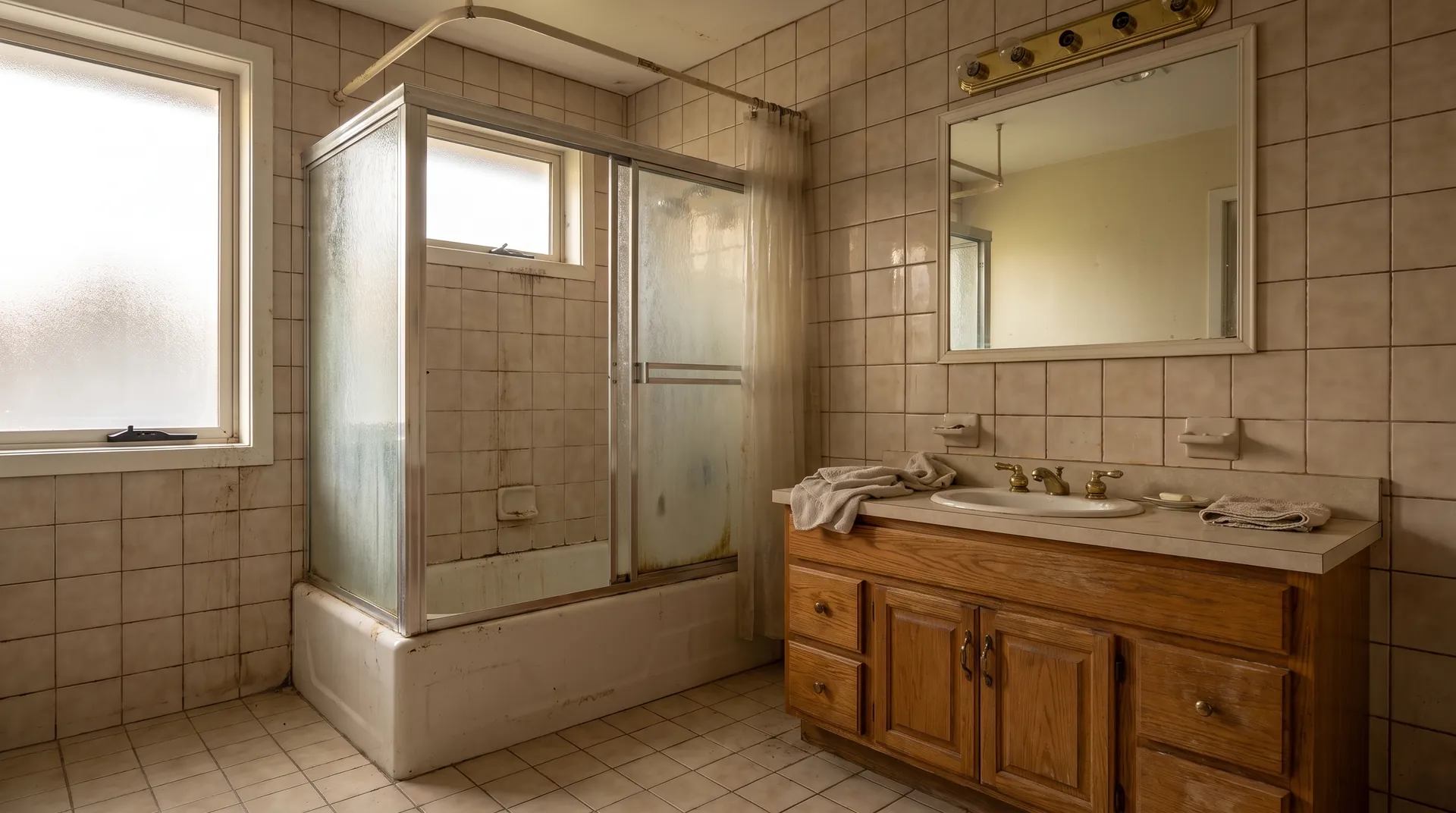
Two prompts on the roughest of the four photos: one finishes-only, one gut.
Navy vanity, white tile, keep the tub
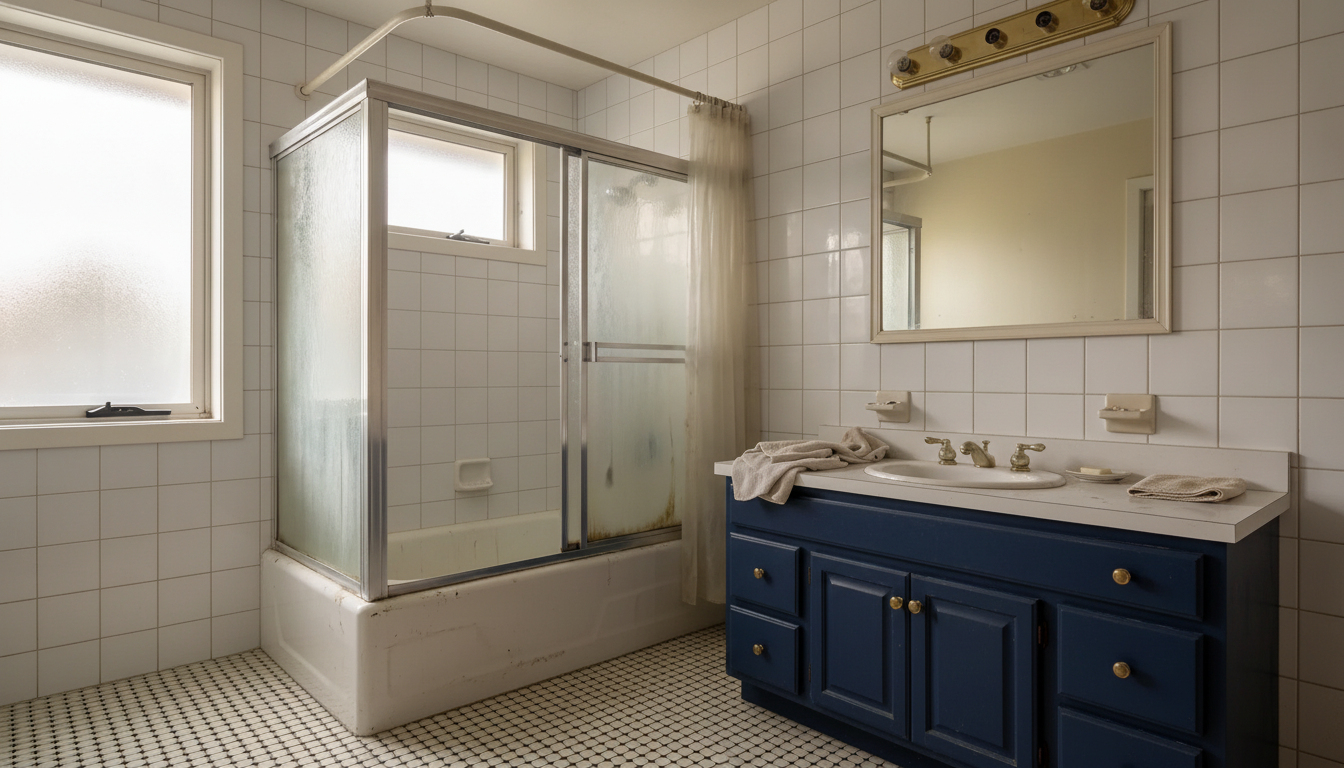
What we told Renovate AI:
Keep this bathroom exactly as it is laid out and change only the finishes: paint the oak vanity deep navy blue with brushed brass knobs, replace the brass strip light above the mirror with three separate brass sconces, replace the beige wall tile with white square tile and white grout, and replace the beige floor tile with small black and white hexagon tile. Keep the bathtub, the sliding shower doors, the window, the mirror and the vanity in exactly the same places.
This is the realistic version of a bathroom refresh. The tub and the shower enclosure stay, which is where most of the money would go, and the navy vanity against white tile does the work. Layout, window and mirror all held.
Free · No account needed · 10 seconds
Full spa gut
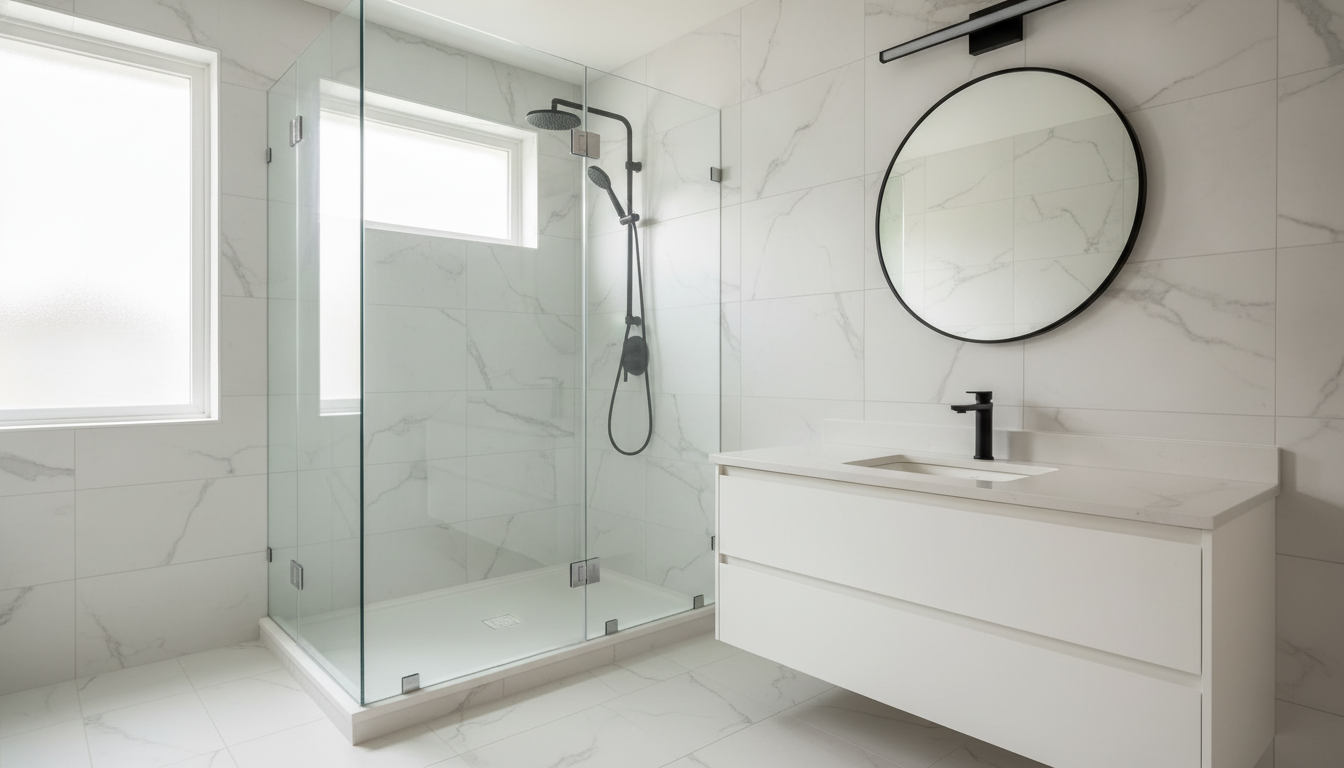


What we told Renovate AI:
Remodel this dated bathroom in a modern spa style: large-format white marble-look tile on the walls and floor, a frameless glass walk-in shower where the tub alcove is, a floating white oak vanity with a white stone top and an undermount basin, a large round black-framed mirror, a slim black wall light above it and matte black taps. Keep the window and the shower alcove position where they are.
The cleanest full-gut result in the set. The walk-in shower sits exactly in the old tub alcove, both windows survived — including the small one inside the shower, the sort of detail that usually gets erased — and the black fittings stay consistent.

Free · No account needed · 10 seconds
What This Kind of Tool Can and Cannot Do
After ten renders on four photos, here is what this kind of tool is for.
Reliable on colour, material and light. Every colour we named showed up — the sage green, the navy, the forest green lowers, the matte black, the white marble — and each sat correctly in the room’s existing light. If your question is what a colour will feel like on your actual house, that is a solved problem.
Reliable at leaving things alone when you say so. The living room render kept every ornament on a five-shelf brass unit; the black-cabinet render kept the coffee maker. Naming what stays is the highest-leverage thing you can put in a prompt.
A render is a picture, not paperwork. It does not come back as a stamped permit drawing or a priced materials list, and that goes for every tool in this comparison. A porch in a render tells you whether the house wants one. Whether the footing can carry it is a contractor’s question, and it always will be.
Which One to Pick, by What You Are Actually Deciding
“What does my house look like in a different colour?” Start here, and spend nothing: 5 free renders, no account needed. The exterior paint visualizer is the direct route. Narrow it to two or three directions on your own photo first, then take those to the paint counter for real chips in real light.
“New floors and paint, but I am keeping my furniture.” The narrow case where naming what stays matters most, and the living room render above is exactly it. Write the sentence the way we wrote it: the change first, then the list of things that do not move.
“I want to see a lot of styles before I commit to one.” Run the same photo several times with one variable changed each time, the way we did four directions on one elevation. Comparing four renders of your own house beats scrolling four hundred of someone else’s.
“I have a floor plan or a sketch, not a photo.” Then you are not waiting for the room to exist. Renovate AI takes a photo, a 2D floor plan or a 3D sketch and edits any of them from a typed sentence, and a plan can come back as a 3D view.
“I need a commercial licence for client work.” Ours is on the Max plan at $99 a month, with three seats included and additional seats at $25. Remodel AI at remodelai.io puts its commercial licence and API access on Ultra, also $99 a month. Both feature lists are worth reading side by side.
The Bottom Line
For the job most people actually have — turning a photograph of a real room or elevation into a decision you can act on — we think Renovate AI is the best of these. The ten renders above are the whole argument. Judge them. They are unretouched and they carry the sentences that produced them, which is more than you can check anywhere else on this query.
The table has the rest: what each one costs, what its free tier really gives you, and which company is actually behind the name on the listing. Every figure dated, every source public. Go and check the ones that matter to you before you put a card in.
More than 230,000 rooms were redesigned with Renovate AI last month, by around 18,000 people. Here is the part that keeps surprising us: the space people redesign most is not the kitchen. It is the outside of the house.
Start with the 5 free renders, no account needed. If the first one does not answer your question, you have lost ten seconds.
More Comparisons and Guides
Now name yours
Pull up a photo of your own space, or just look at it. Answer two questions in plain words:
- What are you actually trying to decide — a colour, a layout, or whether to do the project at all?
- Which one room or elevation would settle it if you could see it?
Most people never name it. They just circle swatches. Finish the sentence — in your words, about your home:
Your sentence rides the button below. Test it on your photo.
Test your answer before you commit. Upload a photo and tell RAI the exact change you're considering. You'll see it on your actual home in seconds.
See it on your home →Free · No account needed · 10 seconds
Stuck between two answers, or not sure what you're looking at? That's a design question. In the Renovate AI app, tap Ask and describe what feels off. Elena will help you name it, then design the direction.
FAQ
- What is the best AI home remodel app in 2026?
- For the job most people are actually doing — pointing a phone at a real room or a real elevation and deciding what to do with it — Renovate AI. We built it, so weigh that accordingly, and then judge it on the ten renders further up this page. Each one carries the sentence that produced it, which is the part you can check. And if all you have is a floor plan or a rough sketch rather than a finished room, Studio handles those too, so you do not have to wait until there is something to photograph.
- Are these apps free?
- Partly, and the terms differ more than the marketing does. Checked 21 September 2026: Renovate AI gives 5 free renders, no account needed. Remodel AI at remodelai.io lists 3 free designs with no card. DecorAI lists 3 free designs a day with no account, each unlocked by watching a video ad and saved with a watermark. RoomGPT's credit pricing sat behind a login, so there was nothing public to read.
- Can I start from a floor plan or a sketch instead of a photo?
- With Renovate AI, yes. You can bring a photo, a 2D floor plan or a 3D sketch and change any of them by typing what you want different, and a plan can come back as a 3D view. Two honest limits. It is AI output, so it sometimes ignores part of an instruction — you can watch that happen in the renders further up this page. And it will not hand you a stamped permit drawing or a priced materials list. Every render on this page started from a photograph, which is simply what we chose to show here.
- Why are there two different apps called Remodel AI?
- Because two unrelated publishers use the name. On 21 September 2026 the US App Store listed "Remodel AI - Home Design" from REIMAGE AI INC., 4.70 from about 14,800 ratings, whose site is remodelai.app; and "Remodel AI - Home Room Design" from Yajun Yang, 3.49 from about 700 ratings, whose site is remodelai.io. Check the developer name on the listing before you subscribe. The reviews you read may not belong to the app you are about to buy.
- How accurate are AI remodel renders?
- Accurate on colour, light and material feel, which is the part you are actually deciding. Across the ten renders on this page the colours and finishes we asked for landed almost every time. Name the pieces you want changed and the pieces you want kept, and they come back the way you asked — every render here prints the sentence that produced it, so you can see the phrasing. Treat a render as a decision about how something will feel.
- Should I show an AI render to my contractor?
- Show it as a direction, not a drawing. A render is useful for settling an argument about colour or style in ten seconds instead of three weekends. It is not a scope of work, it does not carry dimensions, and in our own results it quietly changed windows and appliances that we had explicitly told it to leave alone. Hand over the render and the sentence that produced it, then let the contractor price the real thing.
- Can I try one without making an account?
- Yes. Renovate AI gives you 5 free renders, no account needed — no email, no card, nothing to cancel. DecorAI also lets you start without an account, with three designs a day unlocked by watching a video ad and saved with a watermark. Most of the others want a login before they will show you anything, including their prices. Checked 21 September 2026.
- How much do people actually use these tools?
- More than you would guess. More than 230,000 rooms were redesigned with Renovate AI last month, by around 18,000 people. The space people redesign most is not the kitchen — it is the outside of the house, which stopped surprising us once we thought about how many people spend a year staring at their own front elevation.