
AI Bathroom Remodel From a Photo: See Your New Design Before Renovating

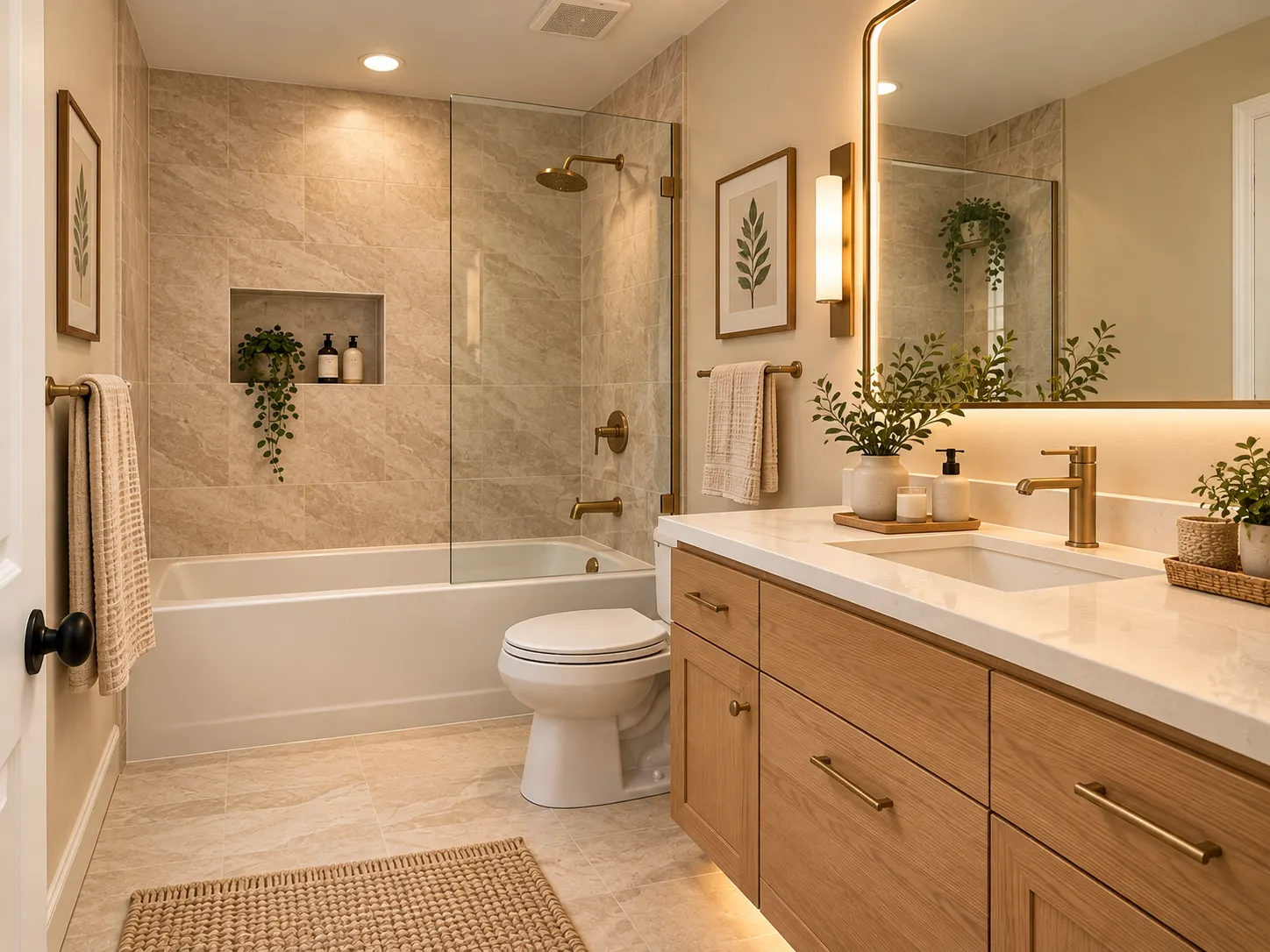
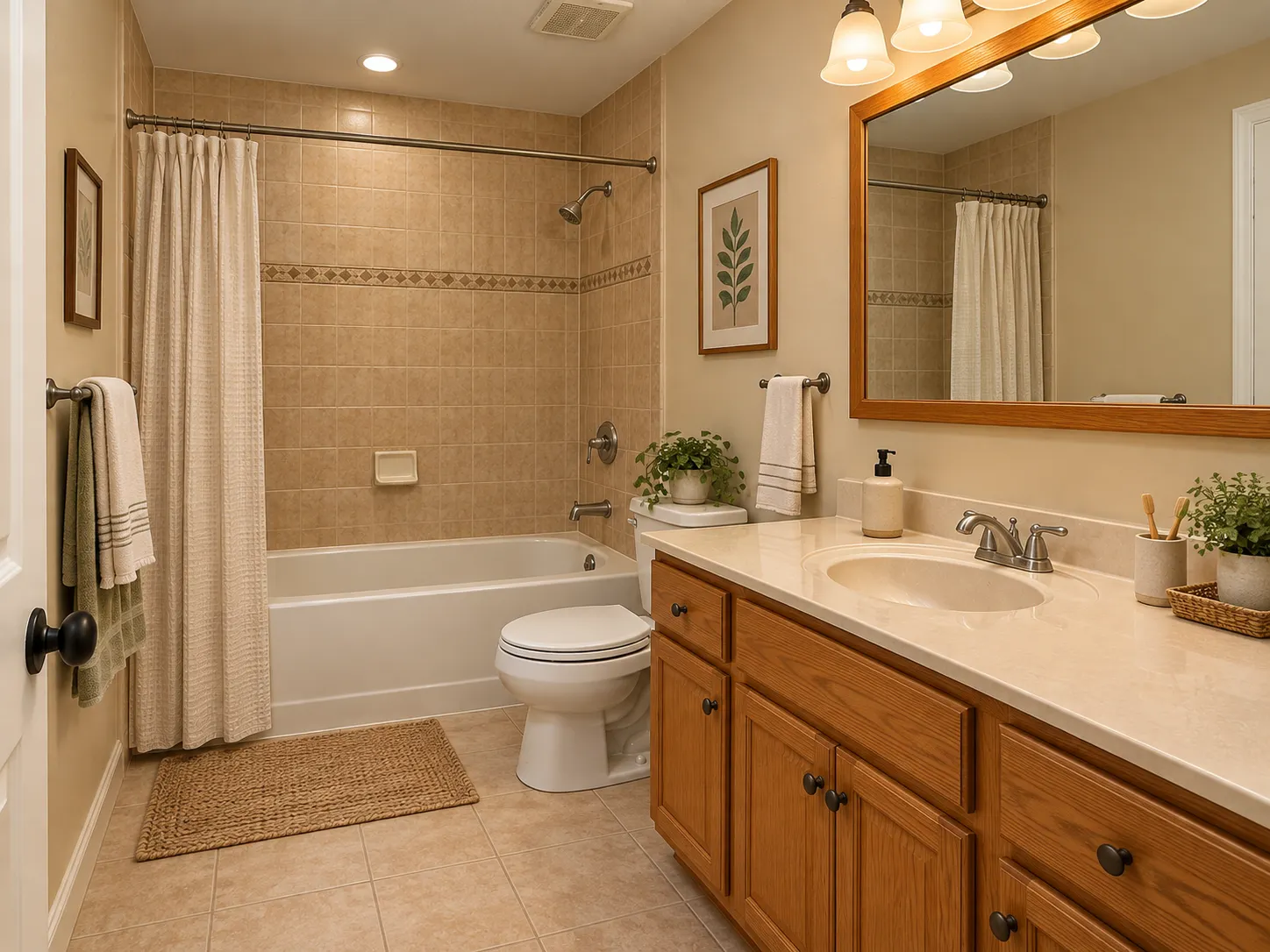
Do you want to remodel your bathroom but do not know how the final design will look?
It can be difficult to choose tiles, a vanity, wall colors, and fixtures from inspiration photos alone.
An AI bathroom remodel tool can make this process easier. Upload a photo of your bathroom. Then, use AI to visualize different designs in your space.
With Renovate AI, you can explore bathroom styles, materials, colors, and finishes before you renovate.
Can AI Remodel My Bathroom From a Photo?
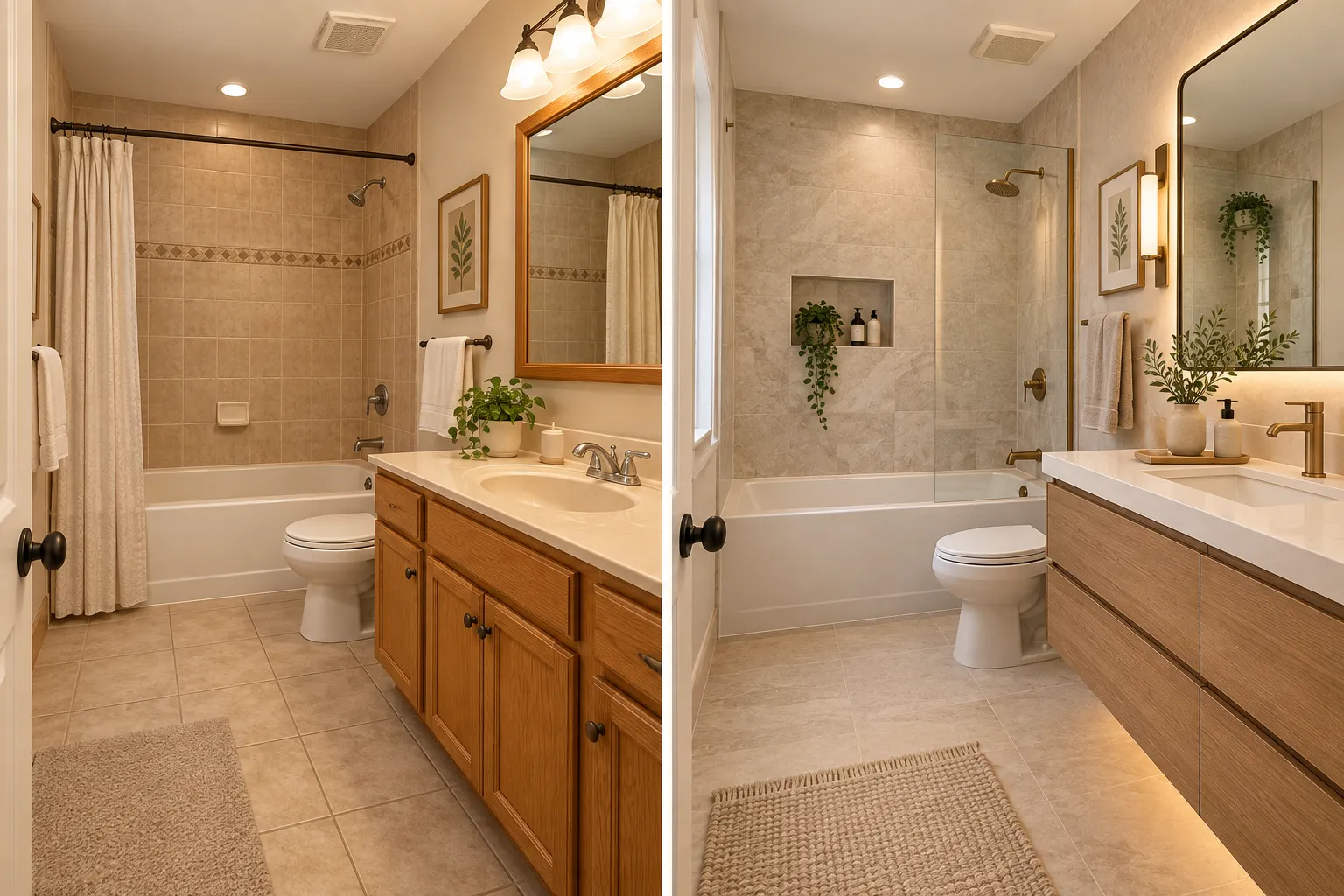
Yes. An AI bathroom remodel tool can use a photo of your existing bathroom to create new design visualizations.
You can use AI to explore:
- New tile colors and patterns
- Different vanity styles
- New wall colors
- Different lighting
- Modern bathroom styles
- New materials and finishes
- Designs that keep the existing room layout
These visualizations help you compare design ideas before you select materials or start the renovation.
How to Remodel Your Bathroom With AI
You do not need interior design experience to start.
Use these four steps.
Step 1: Upload a Photo of Your Bathroom
Take a clear photo of your bathroom.
Make sure that the photo shows the important parts of the room. Include the vanity, shower or bathtub, floor, and walls.
Use good natural light or bright overhead light.
Step 2: Choose a Bathroom Style
Select the design style that you want to explore.
For a calm bathroom, try warm neutral colors and natural materials.
For a modern bathroom, try a floating vanity, simple lines, large tiles, and contemporary fixtures.
You can also describe the changes that you want.
Step 3: Generate the Bathroom Visualization
Use Renovate AI to generate a design from your bathroom photo.
Review the result. Look at the materials, colors, lighting, fixtures, and other design elements.
Step 4: Compare Different Designs
Do not limit your comparison to one design.
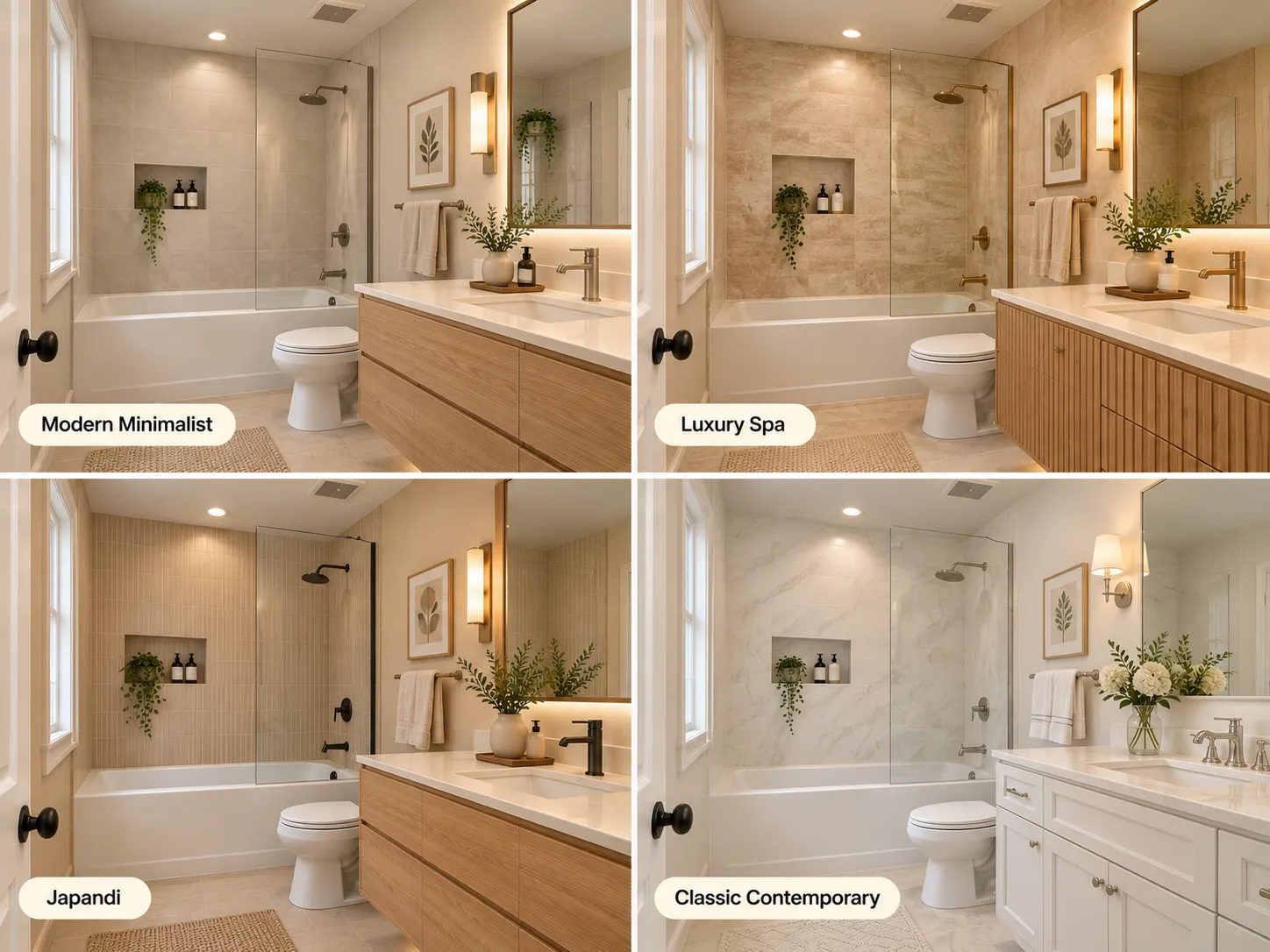
Generate different styles and compare them. For example, compare Modern Minimalist, Luxury Spa, Japandi, and Classic Contemporary designs.
Save the designs that you prefer.
5 Bathroom Remodel Ideas to Try With AI
Use AI to compare different bathroom styles before you select one.
1. Modern Minimalist
Use a floating vanity, large tiles, neutral colors, and simple fixtures.
Best for: Small bathrooms and contemporary homes.
2. Luxury Spa
Use natural stone, warm lighting, wood details, and soft beige colors.
Best for: A calm, hotel-inspired bathroom.
3. Japandi
Combine simple forms with light wood and natural textures. Use a soft and neutral color palette.
Best for: A simple bathroom with a warm appearance.
4. Classic Contemporary
Use white tiles, simple cabinetry, elegant mirrors, and subtle metal finishes.
Best for: Traditional and transitional homes.
5. Budget-Friendly Refresh
Keep the existing bathroom layout. Change wall colors, vanity finishes, mirrors, lighting, and small design details.
Best for: A visible update without a complete remodel.
What Can You Change in a Bathroom With AI?
An AI bathroom visualizer can help you explore different parts of a bathroom design.
Tiles and Flooring
Compare large tiles, marble-look tiles, stone textures, patterned floors, and neutral ceramic finishes.
Vanity Colors and Materials
Try natural oak, white, charcoal gray, and other finishes.
Compare each option with the other materials in the bathroom.
Walls and Paint Colors
Try warm white, soft beige, muted green, and other colors.
Compare the colors with the floor, vanity, and fixtures.
Mirrors and Lighting
Compare different mirror shapes and light fixtures.
Use these changes to explore a brighter or more polished bathroom design.
Shower and Bathtub
Explore glass shower enclosures, different wall finishes, and modern bathtub styles.
Small Bathroom Remodel Ideas With AI
Small bathrooms require careful design choices.
Try light-colored tiles to create a brighter appearance. Use a floating vanity to show more of the floor. Add a large mirror to reflect more light.
You can also explore a glass shower enclosure to reduce visual barriers. Use a warm neutral palette to give the room a consistent appearance.
With Renovate AI, you can visualize these ideas in a photo of your bathroom.
AI Bathroom Visualization vs. Traditional Bathroom Planning
AI visualization and traditional planning have different purposes.
AI bathroom visualization helps you explore the appearance of the bathroom. You can compare styles, colors, materials, and finishes.
Traditional bathroom planning deals with measurements, plumbing, electrical work, material specifications, and construction requirements.
Use AI to define the visual direction of your bathroom. Then, use the visualization when you discuss the project with a designer or contractor.
See Your Bathroom Before You Renovate
A bathroom remodel involves many design decisions. AI can help you visualize these decisions before you start the renovation.
Explore different styles. Compare materials and colors. Use your existing bathroom as the starting point.
With Renovate AI, you can upload a photo and visualize a new bathroom design.
Ready to explore your bathroom makeover?
Try Renovate AI and visualize your bathroom before you renovate.
FAQ
- Can I upload a photo of my bathroom and redesign it ?
- Yes. Upload a bathroom photo to Renovate AI. You can then visualize different styles, colors, materials, and finishes.
- Is there an AI tool for bathroom remodeling ?
- Yes. Renovate AI is an AI home design tool. It uses photos of existing spaces to help you visualize bathroom remodel ideas.
- Can I use AI for a small bathroom remodel ?
- Yes. You can explore ideas such as floating vanities, light-colored tiles, glass shower enclosures, and simple finishes.
- Can I change bathroom tiles with AI ?
- Yes. You can visualize different tile colors, textures, patterns, and styles before you select a design.
- Can I keep the same bathroom layout ?
- Yes. Tell the AI to keep the existing layout. Then, explore new colors, materials, fixtures, and finishes.