
AI Home Renovation Tools: What to Actually Look For

You uploaded your kitchen photo. The one with the oak cabinets you’ve hated for three years. Thirty seconds later you got back a kitchen that looked nothing like yours. Different window placement. Different floor plan. A completely different room.
That’s the test most AI renovation tools fail. And you won’t know until you’ve already wasted your time.
There are at least 15 AI home design apps right now. They all promise the same thing. Here’s how to tell which ones actually work.
1. Does It Keep Your Room?
This is the window test. Look at your original photo. Count the windows, the doors, the architectural details. Now look at the AI result. Did the window move? Did a door disappear? Did the room become six feet wider?
If the AI moved your window, it didn’t renovate your kitchen. It invented a new one. That’s a Pinterest board, not renovation planning.
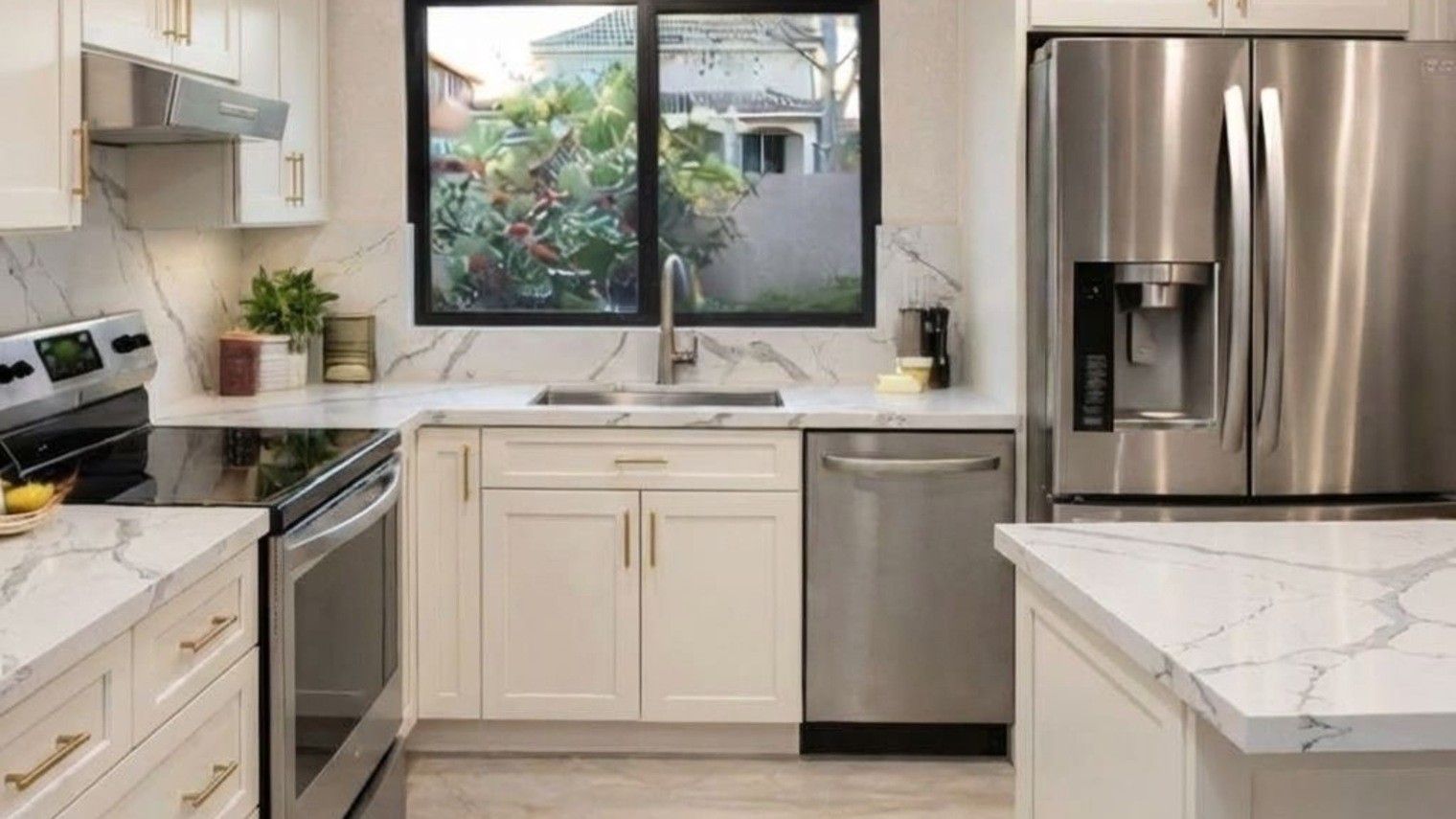
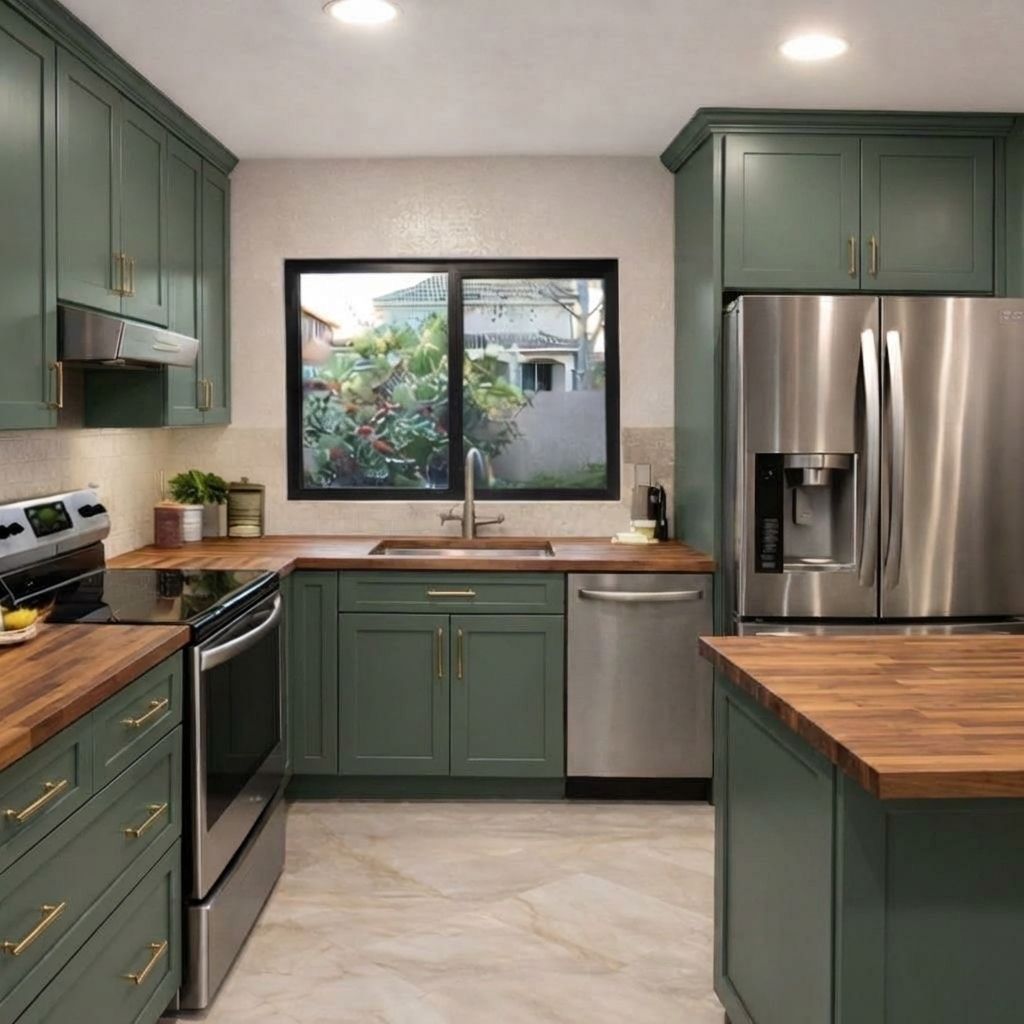
Here’s the same kitchen, three different directions. Notice the window stays exactly where it is:
Before:

Direction 1: Warm white cabinets with marble-look quartz

Direction 2: Sage green cabinets with butcher block
Direction 3: Navy blue with open shelving
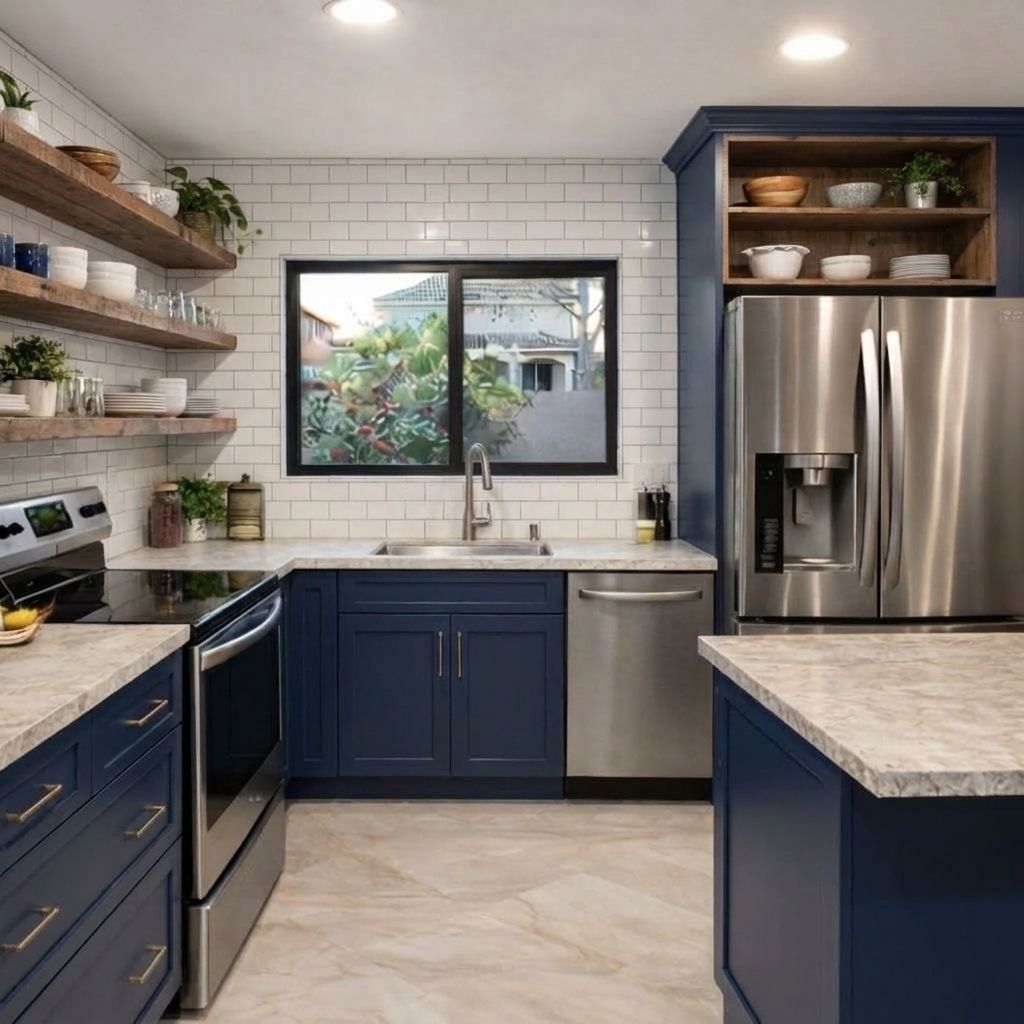
Same window. Same layout. Same appliance positions. Three genuinely different visions. That’s what good AI renovation looks like.
The best tools preserve your room’s actual architecture and change only what you asked to change. Cabinets, paint, countertops. Those are real renovation decisions. Moving a window is a $15,000 structural change that nobody asked for.
What to check: Compare window and door positions before and after. If they moved, the tool is generating fantasy, not showing you your renovation.
2. Can You Try More Than One Direction?
One image gives you one opinion. Would you hire a designer who showed you a single option and said “that’s it”?
You need at least three directions on the same photo to make a real decision. Modern farmhouse. Scandinavian minimal. Bold color. Same room, different visions. That’s how you figure out what actually resonates.
Most apps give you one shot per upload. Or they give you “styles” that all look the same. Slightly different cabinet colors on someone else’s room.
What to check: Upload one photo. Can you get three genuinely different directions without re-uploading? If not, you’re not designing. You’re pulling a slot machine.
3. Does It Tell You What It Costs?
A beautiful kitchen image with no price tag is just a dream with no plan.
Materials, labor estimates, product links. That’s the difference between inspiration and a budget. You need to know: is this a $15,000 project or a $65,000 project? Because that changes everything about whether you do it.
Most AI design tools stop at the pretty picture. They show you marble countertops without mentioning that Carrara marble runs $75-150 per square foot installed. You fall in love with something you can’t afford.
What to check: Does every image come with a cost breakdown? Not a vague “luxury renovation” label. Actual numbers.
4. Can You Tell It What to Keep?
“Change the cabinets but keep the countertop.” “Paint the walls but don’t touch the backsplash.”
If the tool can’t take specific direction about what stays and what changes, it’s a random generator. You need to guide it, not just describe a vibe and hope.
This matters because real renovations are full of constraints. You love your hardwood floors. You just replaced the appliances. You want new cabinets, not a new kitchen. A tool that understands “keep this, change that” is a tool that understands how renovation actually works.
What to check: Try telling the tool to change ONE thing and keep everything else. Did it listen? Or did it change the whole room anyway?
5. Does It Work on YOUR Photo?
Demo photos look great in every app. They’re professionally lit, perfectly composed, and usually show rooms that are already halfway decent.
Your bathroom is not a demo photo. It has weird lighting, a slightly crooked mirror, and that one corner you can never photograph right.
The real test is uploading your actual space. The messy, imperfect, real version. And getting back something useful. If the tool only looks good on demo photos, it won’t help you plan your actual renovation.
What to check: Skip the demo. Upload your worst room. The one you’re embarrassed about. That’s the room you actually need help with. Does the tool handle it?
How to Run the Test
These tools range from free (limited, usually one image) to $10-30/month. Free tools cut corners on quality. Expensive ones overcomplicate simple decisions. Price alone tells you nothing. The checks do.
Download 2-3 apps. Take the same photo of your room. Run all 5 checks on each one. Fill in yes or no. The tool that passes all five is the one worth your time.
What We Told RAI
These three directions came from simple, natural instructions. Short prompts. The AI handles the rest. That’s how it should work.
Direction 1: Warm white with marble quartz:
“Warm white shaker cabinets. Marble-look quartz countertops. Keep the window and layout exactly as-is.”

Free · No account needed · 10 seconds
Direction 2: Sage green with butcher block:
“Dark sage green cabinets. Butcher block countertops. Brass hardware. Keep the window and room layout.”

Free · No account needed · 10 seconds
Direction 3: Navy with open shelving:
“Navy blue lower cabinets, open shelving on top. White subway tile backsplash. Keep the window and appliance positions.”

Free · No account needed · 10 seconds
Same photo. Three prompts. Three images. Under a minute each.
Written by Sid Sarasvati. I built one of these apps. That’s my bias and my credential. The 5 checks work on mine too. And I’d want to know if they didn’t.